By supplying your material according to these guidelines, you ensure smooth production and the best possible end result.
If necessary, we will review the material before printing and assist with any corrections.
GENERAL GUIDELINES
File format
- Please submit your materials primarily in PDF format
- The page size must be the same as the size of the finished product
Colors
- Recommendation: CMYK color mode
- RGB files also work, but the colors may differ in the printed product
Images and Resolution
- Digital printing: 300 dpi
- Large image: 150 dpi
Fonts
- Fonts must be either:
- embed
into a PDF fileor - convert to outlines
- embed
Here's how to ensure that fonts display correctly in all situations
CUTTING MARGINS AND SAFETY ZONE
Cutting allowances are one of the most common causes of errors in data.
Bleed
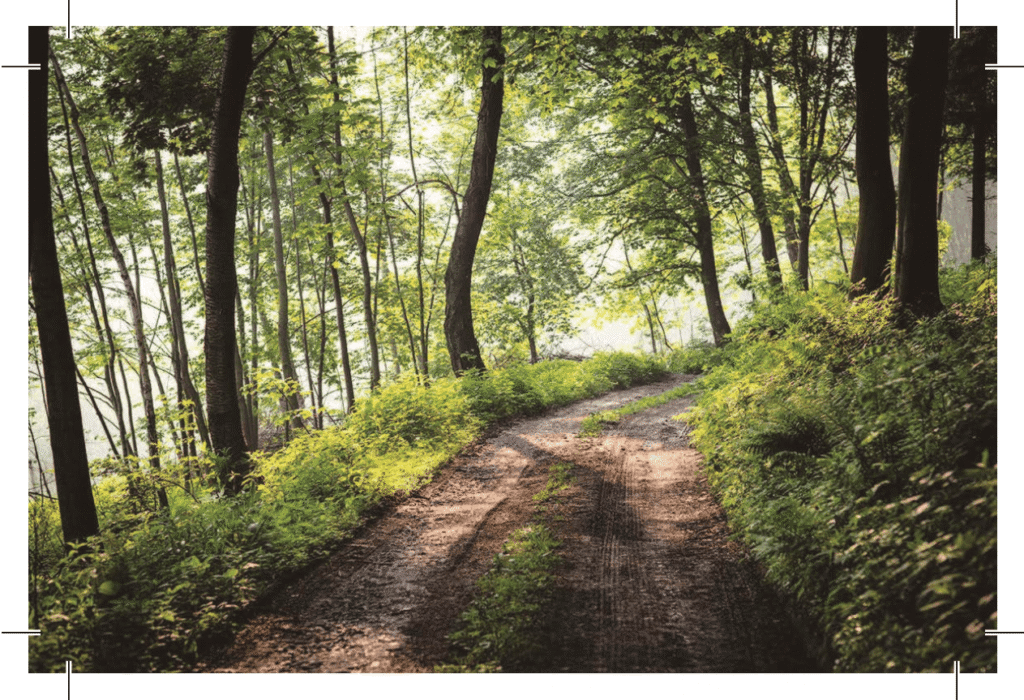
- Add a 3 mm bleed to each edge if the background or image extends all the way to the edge
- The background or image must extend beyond the final size
Safety Zone (Inner Margin)
Keep important content far enough from the edge:
- Recommendation: 3–5 mm from the edges
- Applies to:
- texts
- logos
- important elements
This ensures that no content is cut off
Summary
- Bleed: background/image extending beyond the edge (+3 mm)
- Safety zone: important elements set back (–3–5 mm)
The example below illustrates how the background should extend beyond the final size.
LARGE-FORMAT PRODUCTS
The same guidelines apply to large-format products, with the following clarifications:
Resolution
- Recommended: 150 dpi
Roll-Up Banners
- Add an extra 10 cm to the bottom edge of the material
- This part remains hidden inside the device
Example:
- Finished size: 85 × 200 cm
- Dimensions: 85 × 210 cm
The background color or image should continue into the hidden portion as well
CUTTING PATHS
For contour cutting, the file must contain separate cutting paths.
Implementation
- In vector format
- Marked with a spot color
- Clearly labeled (e.g., “Cut”)
Please Note
- Use different spot colors for different functions:
- cross-section
- scratching
- polishing
- Keep the cut paths on their own layers
GOOD TO KNOW
If you're not sure about the technical aspects of your file, you can also submit it as is—we'll check it before printing.
If necessary, we will make minor corrections to the material.
More extensive changes will be agreed upon separately and billed on a case-by-case basis.